
Archive for 2012
A validating recursive resolver on a $70 home router
Posted by Bob Novas in Adoption, DNSSEC, Technical guides on March 15, 2012
As an experiment, I installed a validating recursive resolver on a home/SOHO router. I also set the router to advertise this resolver in DHCP as the DNS server for the LAN served by the router. The experiment was a resounding success — the clients on the router LAN only receive Secure or Provably Insecure DNS responses and do not receive Bogus responses.
I was able to verify this by navigating to a bogus addresses. For example, here is a screen shot of navigating to a domain with a bogus signature (http://bogussig.dnssec.tjeb.nl). If you are on a non-validating network, you will be able to resolve this link. If your network is validating, however, you should get an error if you click the link.
The HttpWatch browser plugin shows that the DNS query for this address very quickly returns an error.
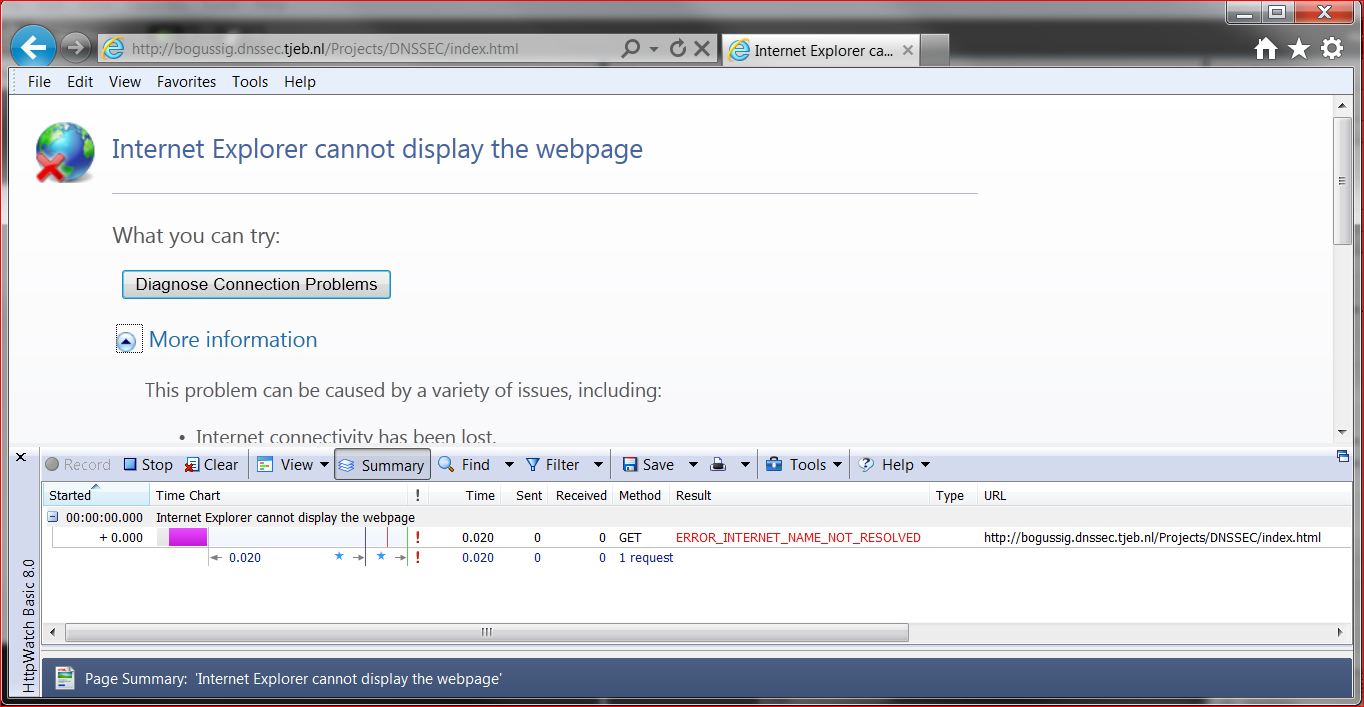
Dump of a DNS query of a domain with a bogus signature
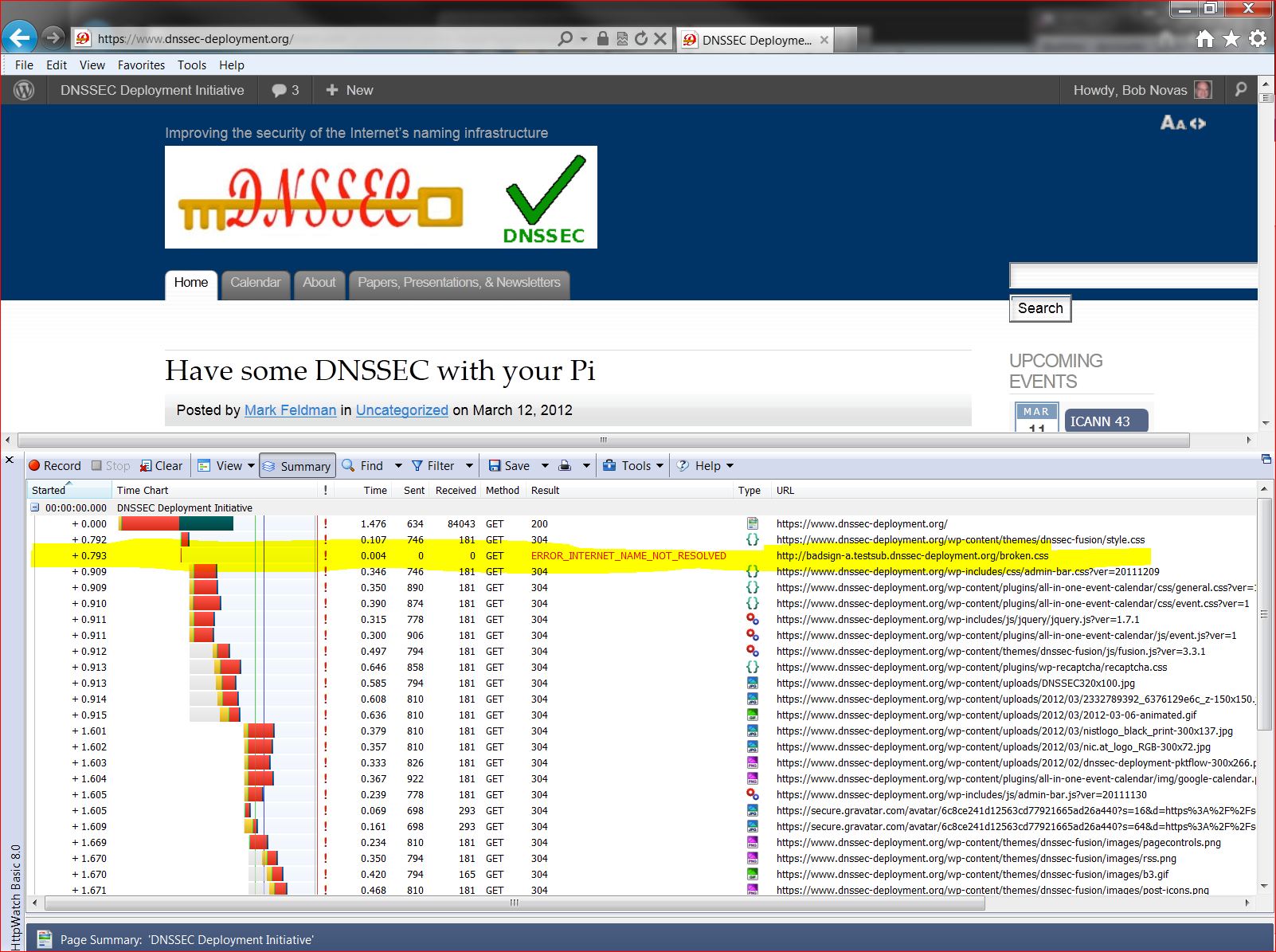
Loading a page where names are signed
So, how did I do this? I started with a Buffalo WZR-HP-G300NH v2 router, which I purchased online for just under US$70. The router runs a customized version of the DD-WRT Open Source software out of the box. The router has 32MB of NVRAM and 64MB of RAM. The basic configuration with an Unbound recursive resolver requires about 10MB of NVRAM, so this router has more than enough storage.
A few words of caution. Not all routers are suitable — you need to have a router that is supported by OpenWRT and the router needs to have enough flash memory. Also, you may lose any special features that are included in the manufacturer’s firmware. For the router I used, I lost the “movie engine” feature and the ability to support a file system on the router’s USB port. I could have loaded more packages from OpenWRT to support a file system. Finally, there is a risk that you will brick the router — i.e., turn it into a paperweight. You’ll need some level of expertise with technology and a platform that supports telnet, ssh and scp (e.g., Cygwin on Windows, or a Mac or Linux box).
Because of the greater ease of configuration that it offers, I reflashed the router with the OpenWRT router software. Then I loaded and configured Unbound, a BSD-licensed recursive resolver and was up and running.
Here are the specifics of how I accomplished this:
- I downloaded the right firmware image for the router from the OpenWRT nightly build site. For the Buffalo WZR-HP-G300NH2 router, I used this build for the squashfs file system for a system upgrade. The system upgrade is because I was going from a DD-WRT build to an OpenWRT build. Other firmware images are available for this router that are specific to other circumstances. If you are not flashing this specific router, you will need to establish the right firmware to use for yourself.
- I connected my PC to a LAN port on the router. I set the PC to use an address on the same subnet as the router – in my case 192.168.1.10 as the router is at 192.168.1.1.
- I pointed my browser at the router, set a password, and logged in to the router’s Web UI.
- I navigated to the Administration/Services page and enabled the SSH daemon. At the same time I set up the authentication for SSH.
- From a terminal window on my PC, I copied the OpenWRT firmware to the router.
scp openwrt-ar71xx-generic-wzr-hp-g300nh2-squashfs-sysupgrade.bin [email protected]:/tmp
- I then logged into the router via ssh to flash OpenWRT onto the router in place of the supplied dd-wrt:
ssh [email protected]

cd /tmp

mtd -r write openwrt-ar71xx-wrz-hp-g300nh2-squashfs-sysupgrade.bin linux
- I waited for a good long while. When the red light stopped blinking, I had successfully flashed the router. It did not yet have a Web UI, but I was able to access it using telnet.
- I used telnet to acces the router with no username or password and set a password. This should disable telnet and enable ssh with that password (username root):
telnet 192.168.1.1
set a password when prompted
- I connected an Ethernet cable from my home LAN to the router’s WAN port (you could also connect the cable directly to your cable or DSL modem).
- I ssh’d into the router and loaded and installed the router’s Web UI, called luci:
ssh [email protected]
opkg update
opkg install luci
⁄etc⁄init.d⁄uhttpd enable
⁄etc⁄init.d⁄uhttpd start
- At this point I was able to login to the router’s Web UI by pointing my browser to 192.168.1.1. On my first login, I needed to set a username and password. I found that no matter what username I set, I always needed to use the username root to login to the router via ssh. It did use the password I set, however.
- I think the best thing to do next is to move the router’s LAN subnet to another subnet. My primary subnet (i.e., the one my ISP’s router provides and the one I have plugged into the router I’m working on’s WAN port) is 192.168.1.x. I logged in to the router’s Web UI and moved the router’s LAN to 192.168.2.1. This avoid IP address conflict between the two subnets. Since my PC is plugged into the LAN port of the router, I had to change my PC’s address to something like 192.168.2.10 so it can talk to the router once it’s on 192.168.2.1.
- I then ssh’d back into the router and installed unbound (This can also be done this using the Web UI from the System/Software page). I ssh’d into the router and used opkg to install Unbound:
ssh [email protected]
opkg install unbound
- I enabled Unbound at startup by navigating a browser to the router’s System/Startup page and clicking on Unbound’s Enabled button to turn it to Disabled.
- I disabled dnsmasq’s (the default DHCP and DNS server on the router’s) DNS function by navigating the browser to the Network/DHCP and DNS/Advanced page and setting DNS Server Port to 0 (zero).
- Finally, from my ssh session, I told dnsmasq to advertise the router (unbound, really) as the DNS server in DHCP responses:
uci add_list dhcp.lan.dhcp_option="6,192.168.2.1"
uci commit dhcp
⁄etc⁄init.d⁄dnsmasq restart
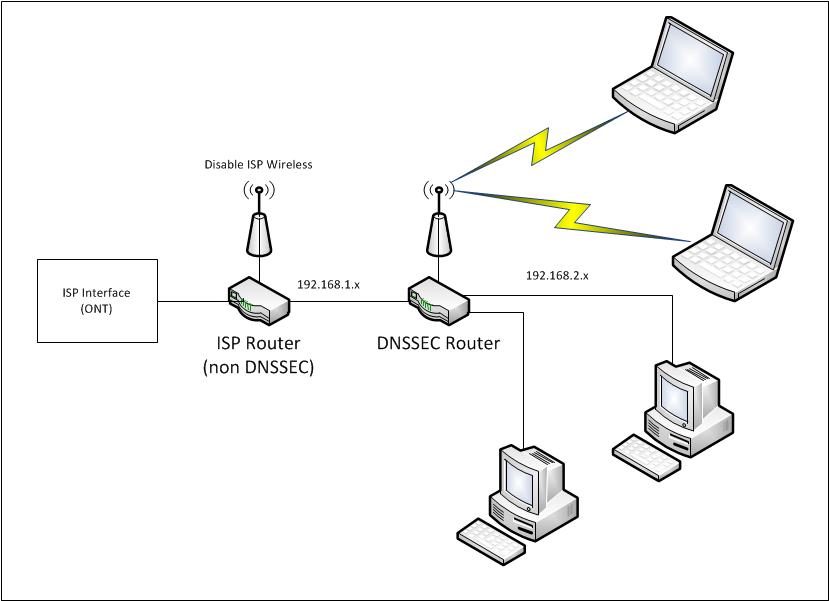
At this point, my router was up and running, dnsmasq’s DHCP was advertising the router as the DNS server, and Unbound was running as a recursive resolver on the router. All computers I put on the 192.168.2.1 router’s LAN that auto-configure using DHCP used this router’s unbound resolver for DNS, and are protected by DNSSEC. My network is configured as shown in the figure below.
One thing we noticed after running the router for a few days — be sure to leave NTP running on the router. In our case, we turned NTP off for some debugging and forgot to turn it back on (NTP is on the OpenWRT System/System page, under “Enable buildin NTP Server”.) After a few days, the router’s time was far enough off to cause validation to fail. Time is important for validation to work correctly because DNSSEC signatures have inception and expiration times.
We plan on doing some benchmarking of Unbound’s performance on this platform and on doing similar experiments with other routers. Email us at info @ dnssec-deployment.org with your experience doing this or any questions or feedback.
Have some DNSSEC with your Pi
Posted by Mark Feldman in Uncategorized on March 12, 2012

Happy Pi Day (to the 36th digit)! by Mykl Roventine
If Pi Day (3/14 in month/day format) isn’t already enough to make this Wednesday a great day, the DNSSEC workshop at ICANN 43 will be streamed live. The streaming information, detailed agenda, and presentations are all available on the DNSSEC Workshop page. The workshop is scheduled to start at 8:30AM CST (UTC-6).
DNSSEC in ccTLDs, Past, Present, and Future
Posted by Mark Feldman in Uncategorized on March 12, 2012
This animated GIF shows announced, estimated, and actual DNSSEC adoption by ccTLDs from January 2006 through July 2014 as of March 6, 2012. The map is a work in progress. We’re pretty sure about the past and present. If you manage a ccTLD and have a schedule for deployment or have updates/corrections, let us know at info @ dnssec-deployment.org. We’d like to see a more colorful, even completely red, map in the future.
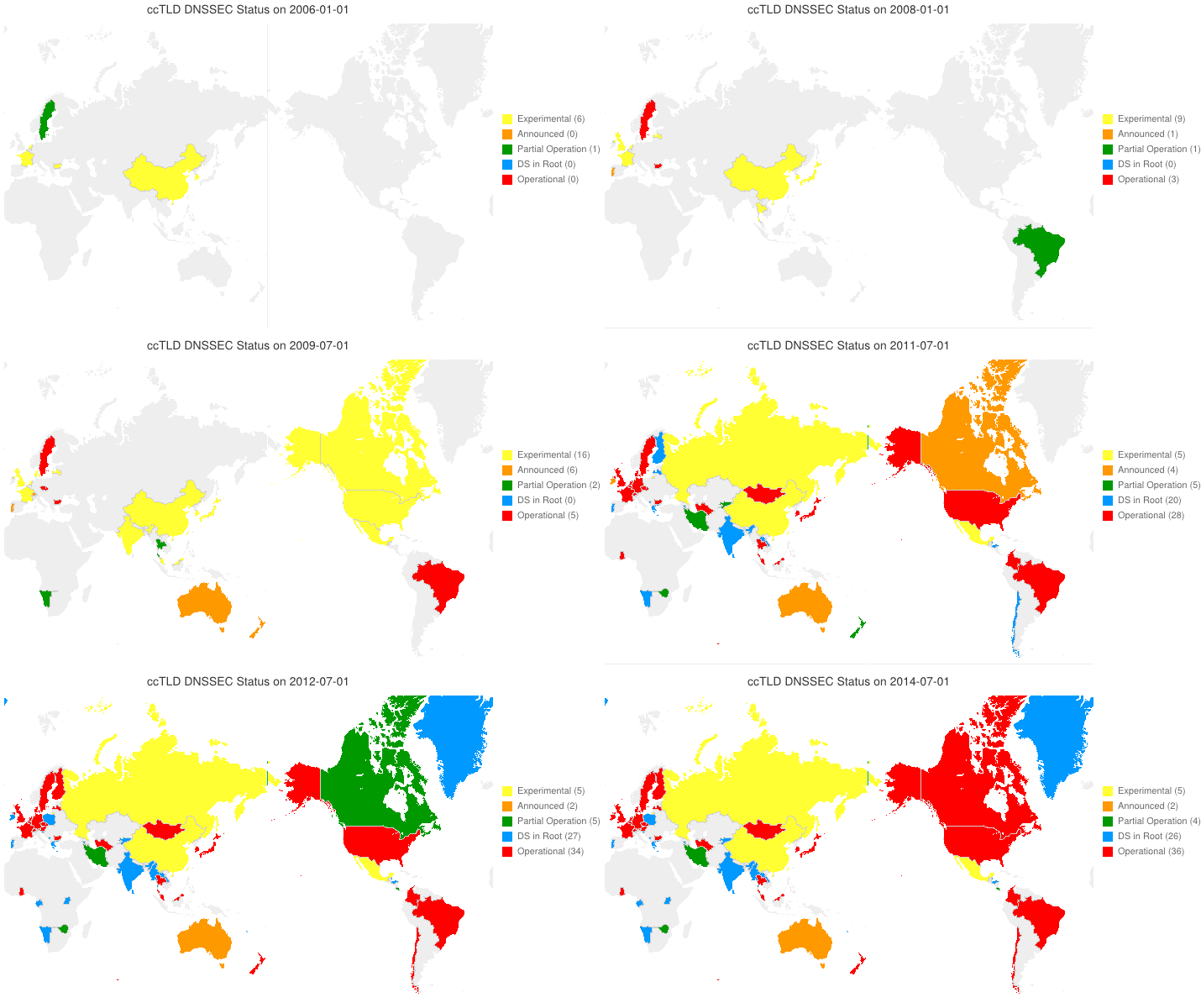
Animated GIF of DNSSEC adoption in TLDs
Key:
- Experimental: We have reason to believe the ccTLD is experimenting with DNSSEC.
- Announced: The ccTLD has announced that they will support DNSSEC.
- Partial Operation: The ccTLD is signed, though possibly doesn’t have its DS in the root or isn’t taking signed delegations.
- DS in Root: The ccTLD has placed its DS in the root.
- Operational : The ccTLD is signed, its DS is in the root, and it is taking signed delegations.
Some Fragments are more equal than other fragments
Posted by Olafur Gudmundsson in Adoption, DNSSEC, Technical guides on March 9, 2012
[Update of a post from January 28’th 2010 to fix broken links and add details]
My last post was about being able to receive fragmented DNS answers over UDP.
Last week (that is on January 20’th 2010) , I did a minor revision to a script of mine that checks to see if all of the name servers for a zone have the same SOA record and support EDNS0. This will indicate whether the servers are in sync and can serve DNSSEC. During testing of the updated script all the servers for .US timed out. This had never happened before, but .US turned on DNSSEC last month, so I started to investigate.
First I issued this query in dig format:
dig @a.gtld.biz US. SOA +dnssec +norec
Time-out confirms my script is reporting correctly. Then I tried again: (not asking for DNSSEC records)
dig @a.gtld.biz US. SOA +norec
This worked, the server is alive and the question has an answer, Then I tried getting the DNSSEC answer using TCP:
dig @a.gtld.biz US. SOA +norec +dnssec +tc
This gave me a 1558 byte answer (too large for one UDP packet) so fragmentation is needed to get over Ethernet links. But my system can handle big answers, so what’s wrong?
At this point I had number of questions:
- “What is NeuStar (the .US operator) doing?”
- “Are any other signed domains showing the same behavior?”
- “Are the fragments from these servers different from other fragments?”
First things first; “What is .US returning in their SOA answer?”
- In the answer section they give out the signed SOA record.
- In the authority section there is a signed NS set.So far, so good.
- In an additional section there are the glue A and AAAA records for the name servers, AND a signed DNSKEY set for the US. zone.
Conclusion: NeuStar is not doing anything wrong, but there is no need for the DNSKEY in the additional section. As this is turning up some fragmentation issues, I consider this a good thing.
At this point I moved on to the second question; “Is anyone else showing the same behavior?” All the signed TLD’s that I queried returned answers of less than 1500 bytes, so no fragmentation was taking place. I modified my script to ask for larger answers in order to force fragmentation. Instead of asking for type “SOA”, I ask for type “ANY”. For signed domains this should always give answers that are larger than 1500 bytes, since signed SOA, DNSKEY, NS and NSEC/NSEC3 are guaranteed to be in the answer and possibly others. Now things got interesting.
Almost all of the signed TLDs had one or more servers that timed out. .Org, for example, had 4 out of 6, .CH had 2, and .SE had one. So the issue is not isolated to anything that the .US operator is doing, but an indicator of something bigger.
I copied my script over to another machine I have and ran it there, and lo and behold, I got answers – no time-outs. The first machine is a FreeBSD-7.2 with PF firewall, the second machine is an old FreeBSD-4.12 with IPFW.
Now on to the next question; “Are the fragments different?” A quick tcpdump verified that answers were coming back. I fired up wireshark tool to do full packet capture. To make the capture smaller I activated the built-in DNS filter, and ran my script against the .ORG servers and the .US servers.
Looking at the DNS headers there was nothing different, and the UDP headers looked fine. On the other hand I noticed that the IP header flags field from the servers that timed out all had DF (Do Not Fragment) set on all packets, and on the first packet in the fragmentation sequence both the DF and MF (More Fragments) bits were set. MF tells IP that this is a fragmented upper layer packet and this is not the last packet. At this point I wondered if somehow this bit combination was causing problems in my IP stack or the firewall running on the host.
I disabled the PF firewall and suddenly the packets flowed through. After doing some searching on the Internet I discovered that I can tell PF to not drop these packets.
My old PF configuration had
scrub in all
The new one is
scrub in all no-df
Removing the scrub command also allows the packets to flow, but I do not recommend that solution.
I started asking around to find out what is causing the DF flag to be set on UDP packets, and the answer was “Linux is attempting MTU discovery”. I also noticed that for the last 2 years Bind releases have added code to attempt to force OS to not set DF on UDP packets. See file: lib/isc/unix/socket.c look for IP_DONTFRAG.
Conclusion: the tools I mentioned in the last post do not test to see if these malformed fragments are getting through. I have updated my perl script to ask for a large answer from an affected site, and to report on that. Please let me know if you have the same issue and what you did to fix it on your own systems and firewalls.
DNSSEC in Higher Education — 1% isn’t enough
Posted by Mark Feldman in Uncategorized on March 7, 2012
Institutions of higher education throughout the world have been key advocates of Internet technologies. The .EDU gTLD is signed, however, a recent survey of .EDU names shows that only about one percent are signed. While this is a greater than the Internet as a whole, it is far less than TLDs that are requiring or otherwise strongly advocating DNSSEC.
On the pedestrian side, colleges and universities present a microcosm of the Internet as a whole, replete with cyber attacks, some of which could prevented by a combination of DNSSEC signing and validation. On the academic side, DNSSEC adds to the authenticity of the academic work product.
If you teach at, work at, attend, or attended any of the following, congratulations — your school is signed:
| acadiana.edu | baker.edu | berkeley.edu |
| bucknell.edu | carnegiemellon.edu | cltc.edu |
| cmu.edu | coloradomesa.edu | csupomona.edu |
| cuhk.edu | desales.edu | fhsu.edu |
| fhtc.edu | gtc.edu | hfg.edu |
| highlands.edu | indiana.edu | indianatech.edu |
| internet2.edu | iu.edu | iub.edu |
| iupui.edu | jhuapl.edu | kestrel.edu |
| lctcs.edu | lsu.edu | ltc.edu |
| ma.edu | mesa.edu | mesastate.edu |
| millikin.edu | minnesota.edu | monmouth.edu |
| mst.edu | myneltc.edu | nau.edu |
| northcentral.edu | northshorecollege.edu | nwltc.edu |
| oxford-university.edu | pacificu.edu | penn.edu |
| psc.edu | richland.edu | rockefeller.edu |
| scl.edu | sdsmt.edu | southern.edu |
| suu.edu | tilburguniversity.edu | tiss.edu |
| truman.edu | ualr.edu | ucaid.edu |
| ucb.edu | ucberkeley.edu | uccv.edu |
| ucr.edu | uiowa.edu | umbc.edu |
| uni-stuttgart.edu | upenn.edu | upf.edu |
| valencia.edu | washjeff.edu | weber.edu |
We’re sorry if your school is signed and we missed it. Our survey was limited to the .EDU gTLD. We know that many schools outside of the US are under their countries’ academic second-level domains or directly under their countries’ ccTLDs. If your school isn’t signed, DNSSEC resources tailored to Higher Education are published by:
- EDUCAUSE, the nonprofit association whose mission is to advance higher education by promoting the intelligent use of information technology, manages the .EDU TLD and worked to get it signed. They have a collection of resources for their members and others throughout the Internet.
- Internet2, the advanced networking consortium led by the U.S. research and education community, is also supporting DNSSEC within its membership. They have a DNS SIG.
The DNSSEC Deployment Initiative is ready to help. Contact us at info @ dnssec-deployment.org to discuss DNSSEC presentations for conferences and meetings.
US Government Agencies will be required to validate
Posted by Mark Feldman in Uncategorized on March 5, 2012
 The US National Institute of Standards and Technology (NIST) announced the release of the fourth revision of Special Publication 800-53: Security and Privacy Controls for Federal Information Systems and Organizations last week. NIST SP 800-53r4 (3.3MB PDF) is the latest revision of the FISMA controls that apply to all Federal information systems. This revision includes changes to the two DNSSEC related security controls (SC-20 and SC-21).
SC-20 combines the previous Enhancement on provisioning of DS RR’s in the parent zone and make it part of the base control.
SC-21 is changed to require “[t]he information system requests and performs data origin authentication and data integrity verification on the name/address resolution responses the system receives from authoritative sources.” This means that all Federal systems must either request and validate DNSSEC responses, or have a trusted link to a validator that can provide that service for the system. Control SC-21 is also changed to be required for all security levels (Low, Moderate and High).
As with previous revisions of NIST SP 800-53, the final set of controls are official twelve months from the final publication date (estimated to be July 2012). The public comment period for this draft ends on April 6th. Comments should be sent to the FISMA project team at [email protected]
DNSSEC now available in .AT
Posted by Mark Feldman in Uncategorized on March 1, 2012
 After signing .AT, providing registrars an opportunity to test DNSSEC enhancements, and performing their own testing, nic.at began accepting DNSSEC delegations on February 29.
Can your links handle DNSSEC sized answers?
Posted by Olafur Gudmundsson in Uncategorized on February 29, 2012
[This is an updated version of a blog post from about 2 years ago to reflect current situation and fix links].
According to various surveys a large majority of recursive resolvers and authoritative servers are DNSSEC ready. This is measured by looking at the resolver that sends queries with the ENDS0 and DO bit set. Similarly, resolvers can measure this by seeing how many authoritative servers return answers with EDNS0 option.
When .GOV was signed some sites noticed that many queries for .GOV took a longer time and resulted in TCP queries. When .ORG was signed there was a large spike in TCP queries to .ORG servers. Both of these spikes can be attributed to large DNSSEC answers that did not get through “narrow” DNS links. To be fair, in both cases the volume of TCP queries was amplified by “mistakes” in signing the zones.
Both zones are signed by NSEC3 (which is fine) but NSEC3 has certain properties that make some of the answers larger than if NSEC was used. GOV originally used 2048 bit RSA zone signing key; this means each signature was 287 bytes long. In an NSEC3 signed zone each negative answer requires 4 signed RRsets, the SOA record plus 3 NSEC3 answers, resulting in answers over 1500 bytes long. ORG’s mistake was to set the TTL of all records at the zone apex to 0, which effectively killed all negative caching for that zone. Once this was fixed, the TCP traffic volume fell. At the height of the TCP flood ORG’s servers were answering about 15% of all queries over TCP.
Both mistakes are actually a good thing, as they highlight certain important issues for future DNSSEC deployment and can help us avoid them in the future. GOV’s spike of TCP connections was primarily caused by “narrow” pipes; i.e. links that cannot handle DNS packets over certain size. In this discussion we will focus on the size issue and how to address it. ORG’s mistake further amplified TCP traffic from resolvers that are sitting behind “narrow” pipes and have ill-chosen fallback mechanisms when big packets cannot get through.
Some technical background: DNS, as defined 25+ years ago, specified a maximum payload size of 512 bytes over UDP. This was appropriate at the time given the links available. RFC2671, issued in August 1999, specifies a mechanism to extend DNS packets in various ways including specifying larger messages. The RFC recommended larger message size of 4096 has become quite common, but because one of the ugly truths of the Internet is that no path is wider than the narrowest link, the large DNS answer does not get through all the time.
Question: “Why are there narrow links?”
There are number of reasons why large UDP messages cannot pass through links. Most links close to edges use Ethernet frames that are about 1500 bytes long. Thus, large TCP and UDP messages are broken up into units (fragments) smaller than 1500 bytes. A large number of links do not allow UDP fragments to pass through or only the first fragment is passed on. There are multiple reasons why this is the case:
– Some implementations in routers/NAT boxes do not know what to do with UDP fragments
– Some firewalls outlaw fragments as a security risk.
– Some firewalls “know” that all DNS are less than N bytes, thus any DNS packet larger that that is bad and is dropped.
If your site wants to use DNSSEC either as a consumer (in resolution) or as a producer (answering for signed zones) it is important that you know how large a message will get through your links, and if the path is restricted, tune your DNS systems to avoid transmission of packets that will not get through. The leading DNSSEC capable DNS resolver implementations – Bind, Unbound, CNS and MS DNS – have to set/change the advertised UDP size. When DNS resolution problems occur it is human nature to want to point fingers at the remote site, but it is just as likely that the problem is local. Fortunately, there are a number of tools that can be used to check resolvers and their paths:
– DNS-OARC has a tool and this Perl script (dns-path) can be used to check all the local resolvers to my code
– DNSFUNNEL is a sub tool in Vantage test tools
– NetAnzlr from UCB is a good network testing tool
Configuring DNS resolvers to ask for smaller answer (using 1480 as example):
Bind-9:
in options set edns-udp-size=1480
Unbound: 1.4.0+ (older versions do not support) set parameter
edns-buffer-size: 1480
Update: 18 months after the root was signed, there are no reports about big problems related to link sizes, this is a result of people checking their links and zone publishers being aware of the issue and keep their RRset’s small enough that the packet size does not become an issue.
DNSSEC Validating Stub Resolver (vsResolver)
Posted by Bob Novas in Uncategorized on February 28, 2012
In order to experiment with validation and provide as simple a working example as possible to others, I have written vsResolver, a stub DNSSEC validator that can be run from the command line of any Windows, Mac or Linux end system. I hope you find it useful and that it helps you understand the complexities of DNSSEC validation.
vsResolver is a validating stub resolver that works in conjunction with a DNSSEC-aware recursive resolver to answer a DNS query with a validated result. vsResolver implements the DNSSEC validation protocol described in RFC’s RFC4033, RFC4034 and RFC4035. vsResolver is not in itself a recursive resolver — it issues DNS queries to a specified DNS recursive resolver to do name resolution. vsResolver does however issue multiple additional queries that are necessary to perform DNSSEC validation. vsResolver works well with a validating recursive resolver such as the BIND recursive resolver from ISC or the Unbound recursive resolver from NLnet labs.
The audience for vsResolver is software developers and system administrators who are interested in an example of a DNSSEC validation algorithm, or who might be interested in a command line domain validation script. vsResolver is comparable to the tools available from Sandia Labs and Verisign Labs. vsResolver differs in that it is usable from the command line, and that it comes as BSD-licensed source code.
You might wonder why you would need vsResolver in addition to a validating recursive resolver. The simple answer is — you don’t. Unbound does validating recursive resolution all by itself. The point of vsResolver is to provide an example of DNSSEC validation that is as simple and straightforward as possible. vsResolver is written in python, a high-level language. (To use vsResolver, you need to have python, dnspython and pycrypto installed on a computer.) vsResolver leverages the dnspython DNS name resolution library and the pycrypto cryptography library and so does not re-implement any code unnecessarily. vsResolver is synchronous, so there are no confusing asynchronous interactions going on. vsResolver can generate diagnostic output that directly reflects the steps the algorithm takes to validate and determine the security outcome of a query. This output is directly comparable to the output from Verisign Labs’ DNSSEC debugger. This provides a way to verify the vsResolver’s security outcome or diagnose problems in the vsResolver validation algorithm.
vsResolver can function as either a utility program or as a software library. That is, vsResolver can run as a command line utility to determine the DNSSEC status of specific domains and resource record types. Alternately, the vsResolver API can be called from python code to do a DNS query and provide the results of that query along with its DNSSEC status, called a Security Outcome, in a variety of ways.
A DNS query is a request for a resource of a particular type from a particular domain. For example, a DNS query might ask for the A data (e.g., the IPV4 Address data) from the comcast.net domain. The result of such a DNS query is the resource data contained in the resource records that resulted from the query. vsResolver provides an additional Security Outcome that indicates the answer’s validity.
The Security Outcome has one of three values: Secure, Provably Insecure, or Bogus. A Secure outcome means that the DNS data returned in the result has a cryptographically validated chain of trust back to a trust anchor. A Provably Insecure outcome means that the result has been verifiably proven to not have a chain of trust back to a trust anchor (in other words, the result is proven to not be signed). A Bogus outcome means that the result is verifiably proven to have a secure chain of trust back to a trust anchor, but the chain of trust fails validation for one reason or another (in other words, the result is proven to be signed but the chain of trust is not valid).
vsResolver provides results within the context of one of three behaviors. In SecureOnly behavior mode, vsResolver only provides a normal result (e.g., a function return) if the answer cryptographically validates to be secure. Otherwise, vsResolver raises a BadResult exception. The BadResult exception contains information to determine whether the answer was actually insecure or bogus. In NoBogus behavior mode, vsResolver provides a normal result if the answer validates to be secure or provably insecure. In Permissive behavior mode, vsResolver provides a normal result regardless of the security outcome.
SecureOnly would be the preferred mode of operation except that many domains are not yet signed. For that reason, NoBogus is the recommended mode of operation for the near term until domains are signed as a matter of course. Operating in Permissive mode is not recommended at all, except for debug, as there is no reason to accept a bogus DNS answer.
vsResolver can run with three modes of trust anchors specified: root trust anchor only, root trust anchor plus additional trust anchors, or additional trust anchors only. Root trust anchor only is the normal mode of operation. In this mode vsResolver uses the root trust anchor as the root of the validation chain of trust. Root trust anchor plus additional trust anchors allows for the validation of domains that validate to disconnected trust anchors as well as validation of domains that validate to the root trust anchor. For example, this mode allows for the validation of a signed subdomain of a domain that is itself unsigned. Finally, additional trust anchors only mode only validates domains that have chains of trust to specific trust anchors; for example, organization A only trusts organization B and no other.
vsResolver can determine the key of the root trust anchor on its own, at least for the near term, as it contains the signature of the present root key. The user can specify alternate signatures for the root key, for use in cases such as when the root key changes, or the user can specify that the root key should not be used. In addition, the user can specify the keys for additional trust anchors, which can be used.
We hope that vsResolver will be helpful as an example of a DNSSEC validation algorithm that can be used directly, or that can serve as an outline for the implementation of DNSSEC validation in other applications.
vsResolver is available at SourceForge.
We have Wiki!
Posted by Mark Feldman in Uncategorized on February 24, 2012
We try to keep ourselves and you informed about all things related to the deployment of DNSSEC, but we can’t do it alone. There are other sites that also publish useful information from a variety of points of view, and we try to bring those to the attention of the community, but they too are incomplete. One source of information that is often overlooked in these blog posts and web sites is you. We appreciate that everyone involved in deploying DNSSEC is on the leading edge (yes, you are) and that you may have as many useful bits of information as questions.
Our solution, which hasn’t been given the spotlight that it deserves, is our wiki. Wander over to https://www.dnssec-deployment.org/wiki/, create an account, and help us document the DNSSEC world. You’ll help others and may learn something in the process.
-
You are currently browsing the archives for the year 2012
Sponsored By

Recent Comments